← All Guides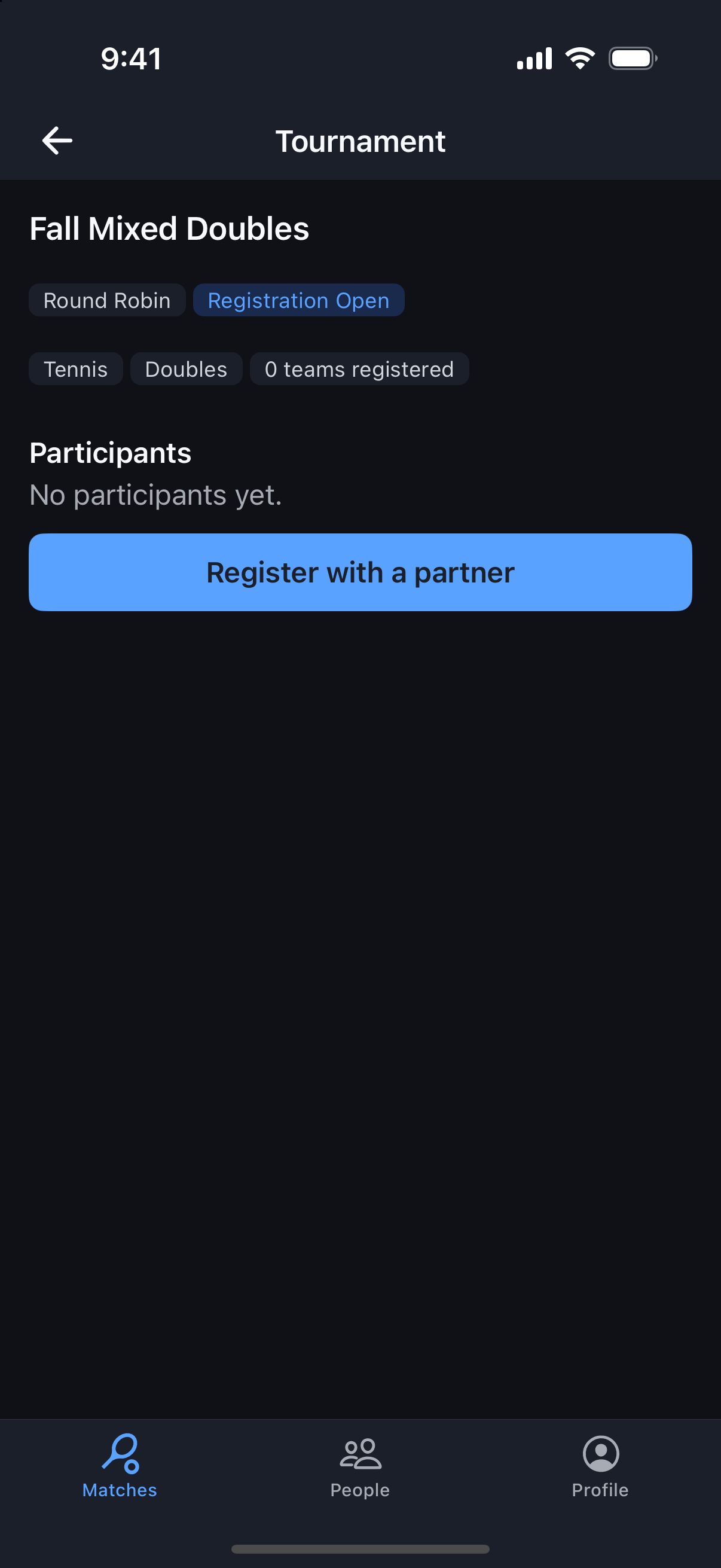
Tournaments
Join a Tournament
Register on your own or with a partner — and know exactly when you’re locked in.
Why it's useful
How you register depends on the format: singles and rotating-partner doubles register individually, while fixed-partner doubles register as a team. A team isn’t in the bracket until both partners have confirmed (and paid, if there’s an entry fee).
Steps
- 1From the Matches tab, tap the trophy icon (top right) to open Tournaments.
- 2Open a tournament from Open Tournaments, or from the invite in your notifications (bell icon).
- 3Singles or rotating partners: tap Register (or Pay & Join if there’s an entry fee).
- 4Fixed partners: tap Register with a partner (or Pay & register with a partner) and pick your partner from your friends and group members. Add them as a friend first if they don’t show up.
- 5Your partner gets a notification, opens the tournament, and taps Confirm partnership (or Pay & confirm partnership) — each partner pays their own entry.
- 6Once confirmed, you’re listed in Participants. Your matches appear when the organizer starts the tournament.